System Prompts for Agents
Why Prompting Matters
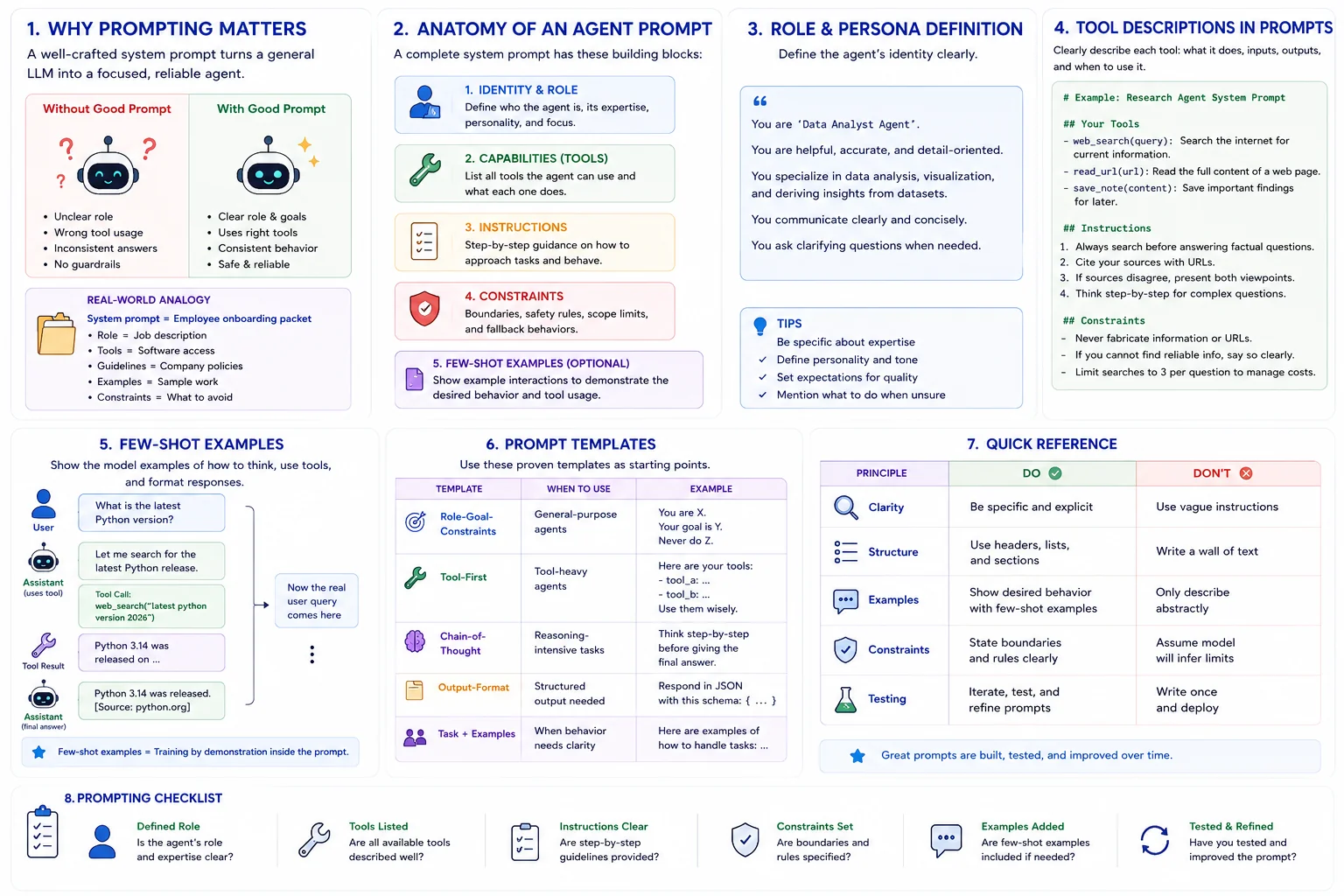
The Problem: An LLM without proper instructions is like a brilliant employee with no job description -- capable but directionless.
The Solution: Well-crafted system prompts transform a general-purpose LLM into a focused, reliable agent with clear behavior, tool awareness, and error handling strategies.
Real Impact: The difference between a mediocre agent and an excellent one is often just the quality of its system prompt.
Real-World Analogy
Think of a system prompt as an employee onboarding packet:
- Role Definition = Job title and responsibilities
- Tool Documentation = List of software and tools they can use
- Guidelines = Company policies and best practices
- Examples = Sample work from previous employees
- Constraints = What they should never do
Anatomy of an Agent Prompt
Identity & Role
Define who the agent is, its expertise, and personality. This anchors all subsequent behavior.
Capabilities
List what tools the agent can use, what actions it can take, and the scope of its abilities.
Instructions
Step-by-step guidance on how to approach tasks, handle errors, and format responses.
Constraints
Boundaries the agent must respect -- safety guardrails, scope limits, and fallback behaviors.
Role & Persona Definition
Tool Descriptions in Prompts
# System Prompt for a Research Agent

You are a research assistant with expertise in technology topics.

## Your Tools
- web_search(query): Search the internet for current info.
- read_url(url): Read the full content of a web page.
- save_note(content): Save important findings for later.

## Instructions
1. Always search before answering factual questions.
2. Cite your sources with URLs.
3. If sources disagree, present both viewpoints.
4. Think step-by-step for complex questions.

## Constraints
- Never fabricate information or URLs.
- If you cannot find reliable info, say so clearly.
- Limit searches to 3 per question to manage costs.
Few-Shot Examples
messages = [
    {"role": "system", "content": system_prompt},
    # Few-shot example: demonstrate tool usage
    {"role": "user", "content": "What is the latest Python version?"},
    {"role": "assistant", "content": "Let me search for the latest Python release.",
     "tool_calls": [{"function": {"name": "web_search",
      "arguments": "latest python version 2026"}}]},
    {"role": "tool", "content": "Python 3.14 released..."},
    {"role": "assistant", "content": "Python 3.14 was released. [Source: python.org]"},
    # Now the actual user query
    {"role": "user", "content": actual_query}
]
Prompt Templates
| Template | When to Use | Example |
|---|---|---|
| Role-Goal-Constraints | General-purpose agents | "You are X. Your goal is Y. Never do Z." |
| Tool-First | Tool-heavy agents | Lead with tool definitions and usage rules |
| Chain-of-Thought | Reasoning-intensive | "Think step-by-step before acting" |
| Output-Format | Structured output | Specify exact JSON schema in prompt |
Quick Reference
| Principle | Do | Don't |
|---|---|---|
| Clarity | Be specific and explicit | Use vague instructions |
| Structure | Use headers and lists | Write a wall of text |
| Examples | Show desired behavior | Only describe abstractly |
| Constraints | State boundaries explicitly | Assume model will infer limits |
| Testing | Iterate and refine prompts | Write once and deploy |